Damage
Per-player and party DPS over the encounter window.
- Real-time DPS, peak DPS, and effective damage.
- Per-skill breakdown for the active fight.
- Encounter start/end markers.
A passive damage, healing, and shielding meter for Farever. Reads the game. Touches nothing.
Windows users — please do this before extracting
Right-click the downloaded .zip → Properties → tick the Unblock checkbox at the bottom of the General tab → OK. Then extract.
If you skip this step, Windows may falsely demand admin rights when you copy dinput8.dll into your Farever folder, and even granting admin can fail with an “unspecified error”. This is a Windows quirk for files downloaded from the internet, not a problem with the file itself.
Already extracted and stuck? Either delete the extracted folder and re-extract after unblocking the zip, or open PowerShell in the extracted folder and run:
Get-ChildItem -Recurse | Unblock-Filev0.3.0 · released July 22, 2026 · 2.9 MB · what’s changed
dinput8.dll437ddf6431a755b7036219ef2755d86a6b4c6976ab88a3af10df076372533deeVerify the .zip against the first hash before extracting, then verify dinput8.dll against the second before copying it into your Farever folder. The dll hash also ships inside the zip as a current-hash file. If either doesn't match exactly, it's not our binary — delete it.
farevercompanion.com is the only official source. If you got the file anywhere else, verify the SHA-256 above before running it.
Windows · DLL overlay · Free
What it does (and doesn't) →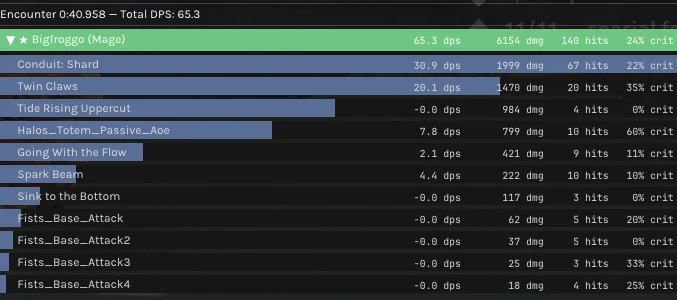
Read this first.
farevercompanion.com. Any other “Farever Companion” download is not ours until its SHA-256 matches what's on this site.Use at your own discretion. Farever is in Early Access; expect breakage between patches.
Features
Companion measures the three numbers that decide a fight, separately and honestly.
Per-player and party DPS over the encounter window.
Effective vs. overheal, separated cleanly.
Damage absorbed before it ever lands.
Companion writes a detailed log for each encounter: every player by name and class, every skill cast, every hit, every heal, every shield applied. Overhealing is separated from effective healing. Per-target damage is tracked individually.
Each encounter snapshot also captures the weapons your party was wearing at the time — both equipped sets and the arsenal swap — so the data is there to correlate output with build choices across runs.
Work in progress
Target name resolution and full gear resolution are still landing. Right now you'll see target UUIDs in some places and partial gear lists for non-weapon slots. Weapons resolve reliably today.
Encounter log dump — screenshot pending
All four classes supported
Multi-class group combat — screenshot pending
More tools coming
Companion is launching with combat metering. Additional tooling for completionist players is in private testing and will arrive in later builds. No ETA yet.
Download
Latest stable build for Farever Early Access. Only available here, at farevercompanion.com.
farevercompanion.com. Anything claiming to be Farever Companion that wasn't downloaded here and doesn't match the SHA-256 below is not ours. Don't run it.Windows users — please do this before extracting
Right-click the downloaded .zip → Properties → tick the Unblock checkbox at the bottom of the General tab → OK. Then extract.
If you skip this step, Windows may falsely demand admin rights when you copy dinput8.dll into your Farever folder, and even granting admin can fail with an “unspecified error”. This is a Windows quirk for files downloaded from the internet, not a problem with the file itself.
Already extracted and stuck? Either delete the extracted folder and re-extract after unblocking the zip, or open PowerShell in the extracted folder and run:
Get-ChildItem -Recurse | Unblock-Filev0.3.0 · released July 22, 2026 · 2.9 MB · what’s changed
dinput8.dll437ddf6431a755b7036219ef2755d86a6b4c6976ab88a3af10df076372533deeVerify the .zip against the first hash before extracting, then verify dinput8.dll against the second before copying it into your Farever folder. The dll hash also ships inside the zip as a current-hash file. If either doesn't match exactly, it's not our binary — delete it.
Verify the download (.zip)
Get-FileHash .\farever-companion-v0.3.0.zip -Algorithm SHA256Run this in the folder where you saved the file. The output's Hash value must match the SHA-256 · .zip download above, character for character.
Verify the binary (dinput8.dll)
Get-FileHash .\dinput8.dll -Algorithm SHA256After extracting, run this in the extracted folder. The output must match the SHA-256 · dinput8.dll above — the same value bundled in the zip's current-hash file.
Your browser may warn you about the download — DLLs and low-distribution files get flagged routinely. That's expected. Verifying both SHA-256 values against those above is how you confirm authenticity before dropping the file into your Farever directory.
Install
No installer, no admin rights, no registry entries. Drop one file in the right place and the game picks it up.
Download the zip
Grab the latest build from the Download section above. The release is a .zip archive containing dinput8.dll, a README.txt, a current-hash file (the dll’s SHA-256), and the font license files.
Unzip the archive
Extract the zip. You’ll get dinput8.dll, a README.txt, and a current-hash file you can check the dll against (plus the bundled font licenses).
Read the README.txt
It carries the most up-to-date install notes for that exact build — any patch-specific caveats will live there first.
Drop dinput8.dll into the Farever game folder
Place the file in the same directory as the game’s executable — the folder that contains Farever.exe (or whichever .exe launches the game). That’s the only file that needs to be there.
Launch the game normally
Start Farever as you always do. The DLL is picked up automatically via the standard DirectInput8 proxy pattern — no extra launcher, no admin prompt, no config.
Delete dinput8.dll from the game folder. That's it — no registry keys, no services, no leftover files. The game returns to its unmodified state immediately.
If you've installed correctly but the overlay either doesn't appear in-game or appears but never updates, NVIDIA Smooth Motion is the most likely culprit.
Questions about the install? The FAQ covers common scenarios including browser download warnings and update procedure.
FAQ
farevercompanion.com. If you found it on another site, a Discord upload, a Google Drive link, a “mirror,” or anything else, treat it as suspicious until you verify the SHA-256 matches the value on this site exactly. If it doesn't match, delete it. We do not authorize any mirrors.dinput8.dll is in the same folder as the game's executable.farevercompanion.com, verify the new SHA-256, replace the file, done.Support
Companion is a free side project. If it saved you a wipe or two, you can drop a tip. No paywalls, no premium tier, no ads — ever.
Where the money goes.
Every contribution goes directly toward development costs and ongoing maintenance — hosting for farevercompanion.com, the domain itself, servers (there may be some moving infrastructure as the project grows — log ingest, analytics, etc.), code-signing if/when we add it, and the time spent keeping Companion working across Farever patches. Nothing else.